How to Install OBB File in Car Parking Multiplayer 2 (Android Guide)
⏱ Time Required: 5–10 Minutes | 📱 Platform: Android | ✅ Updated: June 2026
You installed Car Parking Multiplayer 2, tapped the icon to launch it, and the game either crashed immediately or opened to a black screen without loading anything. The OBB file is almost certainly the problem, and you are not the only player who hits this wall after downloading CPM 2 from outside the Play Store. Installing the OBB file correctly is the missing step that most installation guides skip over, and getting it right takes less than five minutes once you know exactly what to do.
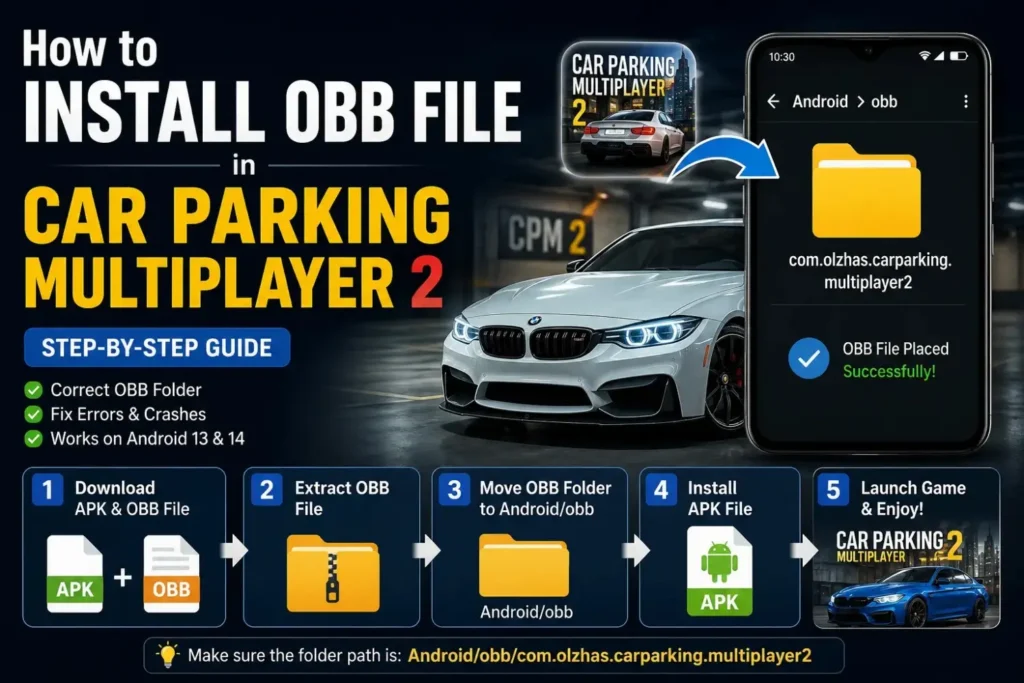
To install the OBB file in Car Parking Multiplayer 2, extract the OBB folder from your downloaded XAPK or zip archive and place it at the exact path Internal Storage/Android/obb/com.olzhassaghatt.carparkingm before installing the APK file on your Android device.
⬇ Download CPM 2 with OBB File Included
What Is an OBB File in Car Parking Multiplayer 2?
An OBB file is a data expansion package that contains all the game resources Car Parking Multiplayer 2 needs to actually run on your Android device. Inside the OBB folder you will find the 3D vehicle models, map textures, audio files, environment assets, and all the visual content that makes the game look and feel the way it does. Without this file present in exactly the right location, the game engine has no assets to render and simply crashes or shows a black screen every single time you try to launch it.
Google introduced OBB files as a solution to the APK size limit that restricts standard Android packages to a size that large games like CPM 2 cannot fit within. The APK handles the game engine and code while the OBB handles the content, and both must work together for the game to function correctly. This two-part structure is why installing CPM 2 from outside the Play Store requires extra steps that the Play Store normally handles invisibly in the background for users downloading through official channels.
The OBB folder for Car Parking Multiplayer 2 uses the package name com.olzhassaghatt.carparkingm as its directory name, and Android uses this exact name to locate the game data every time you launch the app. If the folder name is wrong, the path is incorrect, or the folder is nested inside an extra subdirectory, Android cannot find the OBB and the game fails to load its resources no matter how many times you try launching it.
Requirements Before Installing the CPM 2 OBB File
Check your available internal storage before starting the OBB installation process because running out of space mid-installation creates corrupted files that fail silently without a clear error message. You need at least 2GB of free storage to extract, place, and install both the OBB and APK components of Car Parking Multiplayer 2 without running into storage-related failures. Go to Settings and then Storage on your device to verify you have enough space before downloading anything.
Your Android device needs the Install Unknown Apps permission granted to whichever file manager or installer app you plan to use for the APK installation step. Without this permission, Android blocks the APK installation even after you have placed the OBB file perfectly in the correct location. Go to Settings, then Apps, find your file manager or browser, and enable the Install Unknown Apps toggle before you begin the installation process.
Download the CPM 2 XAPK or the separate APK and OBB files from a verified source such as our site, APKPure, or APKMirror — all of which show exact file sizes and version numbers so you can verify the download completed without corruption. A corrupted OBB file produces the same crash and black screen symptoms as a missing one, so confirming the file size after download prevents you from troubleshooting a placement problem that is actually a download problem in disguise.

How to Install OBB File in Car Parking Multiplayer 2
There are three reliable methods for installing the OBB file in Car Parking Multiplayer 2 on Android. The right method for you depends on how you downloaded the game files and which tools you have available on your device. All three methods achieve the same result, which is placing the OBB folder in the correct location and then installing the APK successfully on your Android device.
Method 1: Install Using APKPure Installer
APKPure is the fastest and most beginner-friendly method because it handles OBB extraction and placement automatically without requiring you to touch any folders manually on your device. The installer detects the XAPK format, extracts both the APK and OBB components, places the OBB in the correct Android directory, and then installs the APK in a single automated process. This method eliminates the most common OBB placement mistakes because the tool handles the path logic for you.
Follow these steps to install CPM 2 with OBB using APKPure:
- Download APKPure from apkpure.com and install it on your Android device.
- Grant APKPure the Install Unknown Apps permission under Settings then Apps then APKPure.
- Download the latest CPM 2 XAPK file directly through the APKPure interface.
- Tap the downloaded XAPK file inside APKPure and select Install when the prompt appears.
- Wait for APKPure to extract the OBB folder and place it automatically in the correct location.
- Allow the APK installation to complete after the OBB placement finishes successfully.
- Launch Car Parking Multiplayer 2 and verify the game loads past the splash screen without crashing.
APKPure handles the Android 13 and Android 14 scoped storage restrictions automatically, which makes it particularly valuable for players on newer Android versions where manual OBB placement through a standard file manager is blocked by the operating system. If you are on Android 13 or 14 and the manual methods are giving you access permission errors, APKPure is the most reliable solution available without requiring root access on your device.
Method 2: Manual Installation Using File Manager
The manual method gives you complete control over every file and works on any Android version where you have file manager access to the Android/obb directory. This is the correct approach when you downloaded the APK and OBB files separately rather than as a single XAPK package, or when you want to verify exactly where every file lands on your device storage. Follow each step in order because skipping any single step is enough to cause the OBB not detected error on launch.
Follow these steps to install CPM 2 OBB manually using your file manager:
- Download the CPM 2 APK file and the OBB file separately to your Downloads folder.
- Open your file manager and navigate to Internal Storage then Android then obb.
- Create a new folder inside obb named exactly com.olzhassaghatt.carparkingm with no spaces or typos.
- Move or copy the downloaded OBB file into this newly created folder.
- Confirm the final file path reads Internal Storage/Android/obb/com.olzhassaghatt.carparkingm/[obb filename].obb
- Navigate back to your Downloads folder and tap the CPM 2 APK file to begin installation.
- Grant the Install Unknown Apps permission if Android prompts you during the installation.
- Complete the APK installation and launch the game to verify it loads correctly.
The folder name must match com.olzhassaghatt.carparkingm exactly including the correct capitalization and dot placement because Android’s file system is case sensitive for OBB directory lookups. A single character error in the folder name causes the game to behave as if no OBB exists even when the file is present in the directory. Double-check the folder name before launching the game to save yourself the frustration of troubleshooting what looks like a different problem.
Method 3: Install CPM 2 XAPK Using ZArchiver
ZArchiver is the best tool for extracting large XAPK files on budget Android devices where the built-in file manager occasionally fails to handle archives larger than 500MB without timing out or corrupting the extraction. The app is free, lightweight, and purpose-built for archive extraction, which makes it significantly more reliable than generic file managers for the full CPM 2 XAPK package. This method works on all Android versions including Android 13 and Android 14 with the correct permissions granted.
Follow these steps to install CPM 2 OBB using ZArchiver:
- Download ZArchiver free from the Google Play Store and open it on your device.
- Download the CPM 2 XAPK file to your Downloads folder from our verified download page.
- Open ZArchiver and navigate to the XAPK file in your Downloads folder.
- Long press the XAPK file and select Extract to and choose a destination folder for the contents.
- After extraction, locate the OBB folder inside the extracted contents.
- Move the OBB folder to Internal Storage/Android/obb/com.olzhassaghatt.carparkingm.
- Navigate back to the extracted contents and tap the APK file to install it.
- Launch Car Parking Multiplayer 2 after installation completes to confirm the OBB loads correctly.
ZArchiver preserves file integrity during extraction better than the rename-to-zip method on files larger than 1GB, which matters for players downloading the complete XAPK with the full OBB data package included. If your extraction using another method produces an OBB file with a different size than the source showed, ZArchiver re-extraction from the original XAPK almost always produces a clean uncorrupted OBB file that installs without any issues.
⬇ Download CPM 2 Latest Version with OBB
Where to Place the CPM 2 OBB Folder
The OBB folder for Car Parking Multiplayer 2 must be placed at one specific path on your internal storage and nowhere else will work regardless of how logical another location might seem. The exact correct path is Internal Storage then Android then obb then com.olzhassaghatt.carparkingm and the OBB file itself sits inside that final named folder. Android looks for game data at this specific path every time any app launches, and any deviation from the correct structure results in the game failing to find its resources.
The most common placement mistake players make is putting the OBB file directly inside the obb folder without creating the com.olzhassaghatt.carparkingm subfolder first. The OBB file must be inside the package-named folder, not floating loose inside the obb directory itself, because Android’s asset resolution system requires the package name folder to identify which app owns which data files. Players who make this mistake see the game crash on launch even though the file is technically in the obb directory because the final path structure is still wrong.
The second most common mistake is placing the OBB folder on an SD card rather than internal storage. Android requires game OBB files to reside on internal storage for the package manager to locate them correctly, and placing them on external storage causes the same crash and black screen behavior as a missing OBB regardless of which Android version you are running on your device.
How to Access the Android OBB Folder on Android 13 and Android 14
Android 13 and Android 14 introduced scoped storage restrictions that block direct access to the Android/obb and Android/data directories through most standard file manager apps. Players on these Android versions open their file manager, navigate to the Android folder, and find that the obb and data directories are either invisible or locked behind a permission wall that the file manager cannot bypass. This is one of the most searched problems in the CPM 2 installation community right now because so many players upgraded to Android 13 or 14 and suddenly cannot complete the OBB placement step.
The cleanest solution on Android 13 and Android 14 is using APKPure as described in Method 1 above because it has system-level permissions that bypass the scoped storage restriction without requiring any additional configuration from you. For players who want to use a file manager instead, Files by Google has access to the Android/obb directory on Android 13 and 14 when you navigate through its built-in storage manager rather than through the standard file browse interface. Open Files by Google, tap the three-line menu, select Browse, scroll down to Android, and you will find access to the obb folder that other file managers cannot reach.
ZArchiver also maintains access to the Android/obb directory on Android 13 and 14 through its archive extraction interface, which is why Method 3 works reliably on newer Android versions where Method 2 using a standard file manager frequently fails with a permission denied error. Grant ZArchiver access to all files under Settings then Apps then ZArchiver then Permissions then Files and Media then Allow Access to All Files before attempting extraction and placement on Android 13 or 14.
Common CPM 2 OBB Installation Errors and Fixes
OBB installation errors in Car Parking Multiplayer 2 follow consistent patterns that each have a direct and specific fix. The symptoms of most OBB errors look identical from the player’s perspective because they all produce either a crash on launch or a black screen, but the root cause determines which fix actually works. Working through these fixes in order from most to least common gets you to the solution faster than trying random approaches.
Fix 1: CPM 2 OBB File Not Detected
When the game opens and immediately crashes or shows a black screen the OBB is either missing, misplaced, or the folder name contains an error. Open your file manager and navigate to Internal Storage then Android then obb and verify the folder named com.olzhassaghatt.carparkingm exists and contains the OBB file inside it. If anything about the path is wrong, correct it and relaunch the game without reinstalling the APK since the APK itself is fine and only the OBB placement needs fixing.
Fix 2: App Not Installed Error During CPM 2 Installation
The App Not Installed error during CPM 2 setup almost always means an existing version of the game is creating a signature conflict with the new APK you are trying to install. Go to Settings then Apps and uninstall any existing CPM 2 version completely, delete the OBB folder from Android/obb, restart your device, and then install the new APK fresh. Our detailed CPM 2 not installing guide covers every variant of this error with targeted fixes for each specific cause.
Fix 3: Version Mismatch Error in CPM 2
A version mismatch error happens when the APK version and the OBB version do not match each other, which causes the game engine to fail when loading resources because the asset format changed between versions. Always download both the APK and OBB from the same source at the same time to guarantee they are from the same release version. If you downloaded them separately at different times, delete both, download a matched pair together, and reinstall following the complete process from the beginning.
Fix 4: Play Protect Blocking CPM 2 APK Installation
Play Protect silently blocks CPM 2 MOD APK installations because the modified signature does not match Google’s verified certificate for the official game. Open Google Play Store then tap your profile icon then Play Protect then Settings and turn off Scan apps with Play Protect before installing the APK. Re-enable Play Protect immediately after the installation completes successfully to restore your device’s ongoing protection against genuinely harmful applications.
Fix 5: Corrupted OBB File After Extraction
A corrupted OBB file produces crash symptoms identical to a missing OBB, and the only way to confirm corruption is to compare the extracted file size against what the source showed before downloading. Delete the corrupted OBB, re-download the XAPK on a stable WiFi connection, and use ZArchiver for re-extraction since it handles large archives more reliably than the rename-to-zip method on budget Android devices. After re-extraction verify the OBB file size matches before placing it in the obb directory and relaunching the game.
Fix 6: App Not Installed or Blocked on Samsung Devices
Understanding the difference between an OBB file and an XAPK file saves significant confusion when you are trying to figure out which download to grab and which installation method to follow. An OBB file is a single data archive containing game resources that you place manually in the Android/obb directory. An XAPK file is a bundled package that contains both the APK installer and the OBB data archive compressed together into one convenient download that a compatible installer handles automatically.
When you download CPM 2 as an XAPK you get both components in one file and need an XAPK-compatible installer like APKPure or ZArchiver to handle the extraction and placement correctly. When you download the APK and OBB separately you get two distinct files and must handle the OBB placement manually before installing the APK. Both approaches achieve the same result but the XAPK method is faster and less error-prone for players who are not comfortable with Android file management.
If you have been downloading the XAPK and trying to install it directly through the standard Android package installer you have been hitting errors because the standard installer only handles APK files and ignores the OBB component entirely. Our complete XAPK installation guide for CPM 2 covers the full XAPK installation process in detail if you want a dedicated walkthrough for that specific file format.
Frequently Asked Questions
Q: Where do I put the OBB file for Car Parking Multiplayer 2?
Place the OBB file inside a folder named com.olzhassaghatt.carparkingm located at Internal Storage/Android/obb on your device. The OBB file must sit inside that package-named folder and not directly in the obb directory itself or the game will not detect it on launch.
Q: Can I install CPM 2 without an OBB file?
No. The OBB file contains all the game’s visual assets, maps, and 3D models that the game engine needs to render the game environment. Installing only the APK without the OBB produces a crash or black screen on every launch because the engine has no game data to work with.
Q: Why does CPM 2 crash after I placed the OBB file?
A crash after OBB placement usually means the folder name is wrong, the OBB file is corrupted, or the APK and OBB versions do not match. Verify the folder is named exactly com.olzhassaghatt.carparkingm, check that the OBB file size matches the source, and confirm both files came from the same version release.
Q: How do I access the Android/obb folder on Android 14?
Use Files by Google through its storage manager interface or use APKPure and ZArchiver which both have system-level permissions to access the Android/obb directory on Android 13 and 14. Standard file managers are blocked from this directory on newer Android versions due to scoped storage restrictions introduced to protect user data.
Q: Why is Play Protect blocking my CPM 2 APK installation?
Play Protect flags CPM 2 MOD APK files because the modified signature does not match Google’s official certificate for the game. Temporarily disable Scan apps with Play Protect under Google Play Store then Profile then Play Protect then Settings before installing, and re-enable it immediately after the installation succeeds.
Q: How do I fix the CPM 2 version mismatch error?
A version mismatch means your APK and OBB files are from different release versions of the game. Download both files together from the same source at the same time to guarantee version compatibility, uninstall the current version, delete the existing OBB folder, and reinstall using the matched pair of files.
Q: What is the correct OBB file name for Car Parking Multiplayer 2?
The OBB file name varies by game version but always follows the format main.[version number].com.olzhassaghatt.carparkingm.obb. The folder containing it must always be named com.olzhassaghatt.carparkingm regardless of which version you are installing.
Q: Why does XAPK say “App Not Installed” on my Samsung phone?
Always place the OBB file before installing the APK rather than the other way around. Installing the APK first and then trying to add the OBB afterward sometimes causes the game to initialize without the data and cache an error state that persists even after you correctly place the OBB. The correct order is OBB placement first, then APK installation, then launch, and following this sequence prevents the most common CPM 2 installation headaches from appearing in the first place.
Final words
If you run into OBB-related problems after a CPM 2 update, check our CPM 2 update guide for the correct process to replace the old OBB with the new one without losing your saved progress in the process. Update-related OBB errors are different from fresh installation errors and require a slightly different approach to resolve cleanly without triggering package conflicts or version mismatch errors that appear when the update process is not followed in the correct sequence.
If an install fails for no obvious reason, a simple device reboot before troubleshooting further clears a surprising number of stuck installer states. Keep the original XAPK file you downloaded in your Downloads folder until you confirm the game launches and runs correctly after installation. Having the original file available means you can re-extract a fresh OBB instantly if something goes wrong during placement without needing to download the entire package again on your connection. Once the game is running perfectly you can delete the XAPK to free up the storage space it occupies on your device.